
Assignment Deadlines Pro for LearnDash
Assignments on Time, Every Time!
“Assignment Deadlines Pro for LearnDash” revolutionizes assignment management in e-learning. Set and extend deadlines with ease, restrict late submissions, and keep students informed with automated email notifications. A must-have tool for efficient learning progression.
Current Version
2.2.0
WordPress
6.4.1 or Higher
LearnDash
4.8.0 or Higher
PHP
8.1 or Higher
Last Update
14 Feb 2025
Plugin Overview & Features
In the dynamic world of online education, maintaining structure and discipline is key. That’s where “Assignment Deadlines Pro for LearnDash” steps in, bringing a new level of efficiency and organization to your courses.
Picture this: You’re managing an online course with multiple assignments. Without a robust system, tracking deadlines can become chaotic, leading to a stressful experience for both you and your students. Our plugin transforms this scenario, offering a streamlined solution to manage deadlines effectively.
With “Assignment Deadlines Pro for LearnDash,” you gain unparalleled control over your course’s assignment schedules. Easily set deadlines for each assignment, ensuring your students stay on track. But we understand that flexibility is crucial. Therefore, our plugin allows you to extend deadlines by hours or days, accommodating unforeseen circumstances without disrupting the course flow.
Moreover, keeping students informed is vital. Our automated email notifications ensure that every student is aware of deadline changes, promoting a transparent and communicative learning environment.
Beyond setting deadlines, our tool empowers you to enforce them. With the functionality to restrict submissions post-deadline, you uphold the integrity and rigor of your course, preparing students for real-world deadlines.
How Can This Plugin Be Used?
- Ensuring Assignment Discipline in Timed Courses
- Bulk Updating Deadlines for Specific Groups of Students
- Managing Deadlines Across Multiple Courses
- Handling Course Extensions for Individual Students
- Seamlessly Send Deadline Extension Emails
- Automatic Deadlines for Rolling Enrollment
- Effortlessly Adjust Assignment Deadlines for Holidays and Breaks
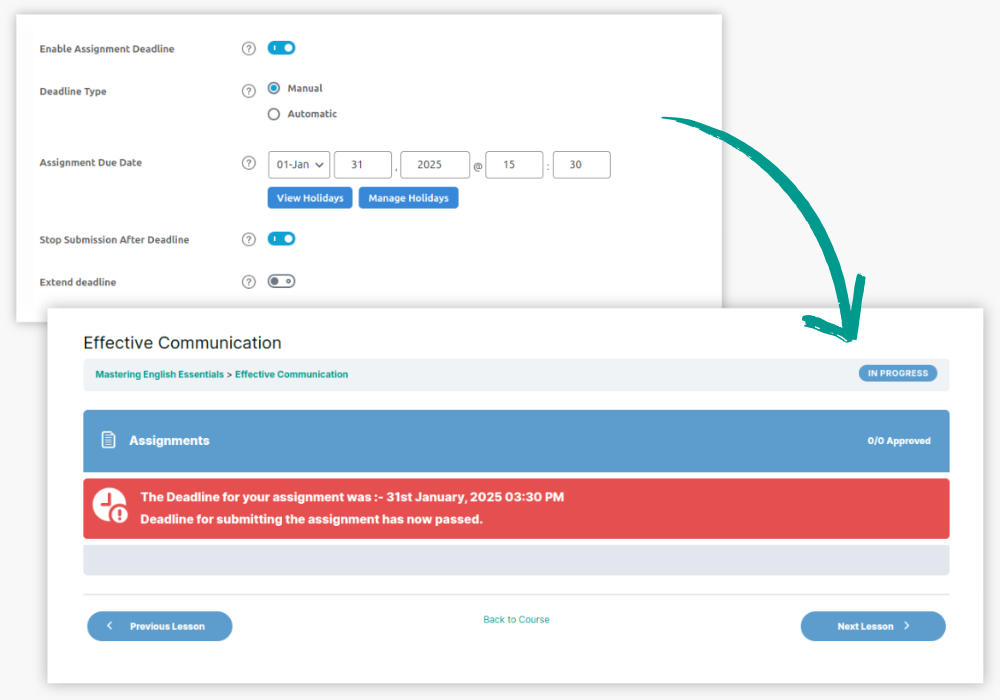
For timed courses where strict deadlines are crucial, such as certification programs, the plugin allows you to enforce submission restrictions after the deadline for LearnDash assignments.
This helps maintain discipline and ensures that all students meet the course requirements within the set timeframe.
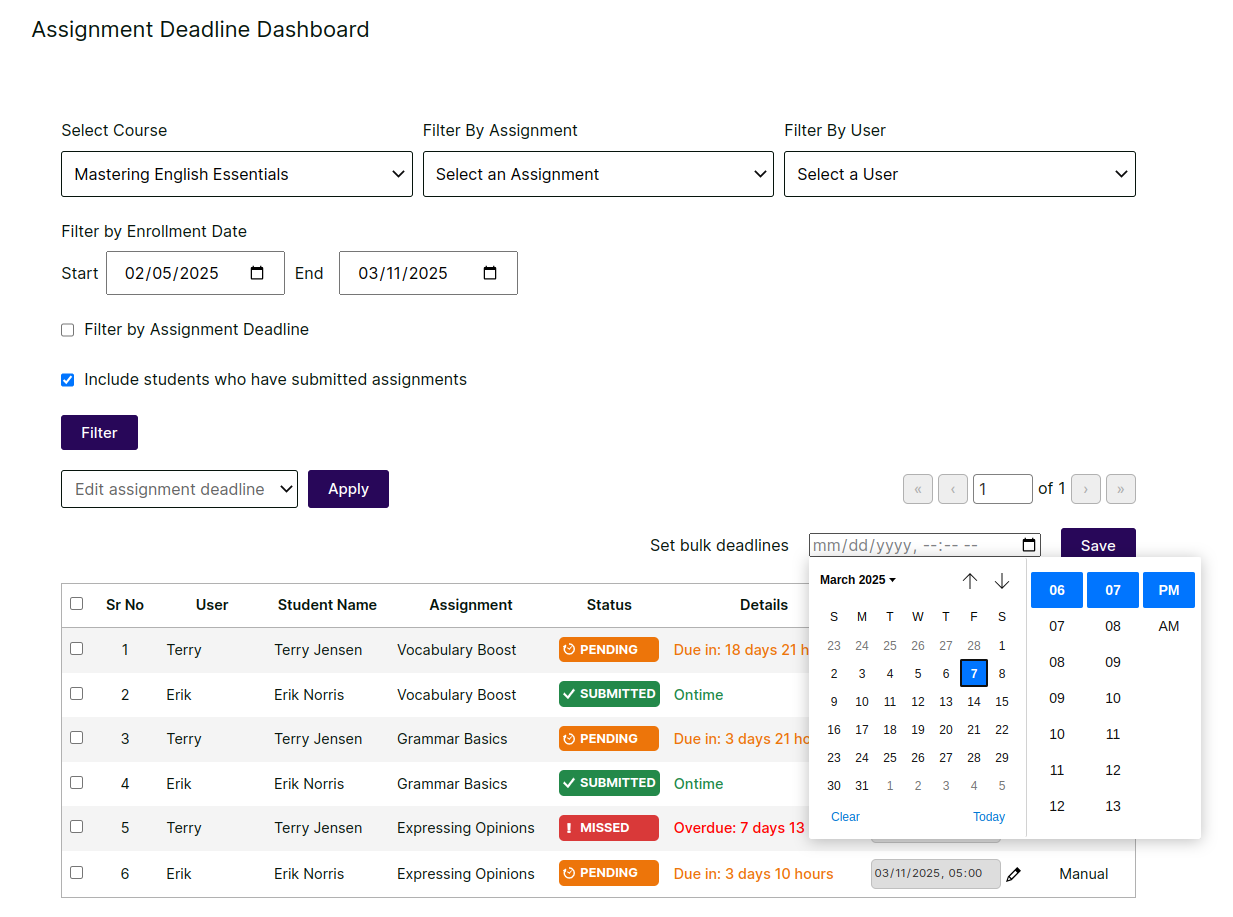
In situations where an entire group of students needs extra time due to unforeseen events (such as technical issues or holidays), you can bulk update deadlines for that group in a few clicks, ensuring fair treatment for all affected students and effective LearnDash assignment management.
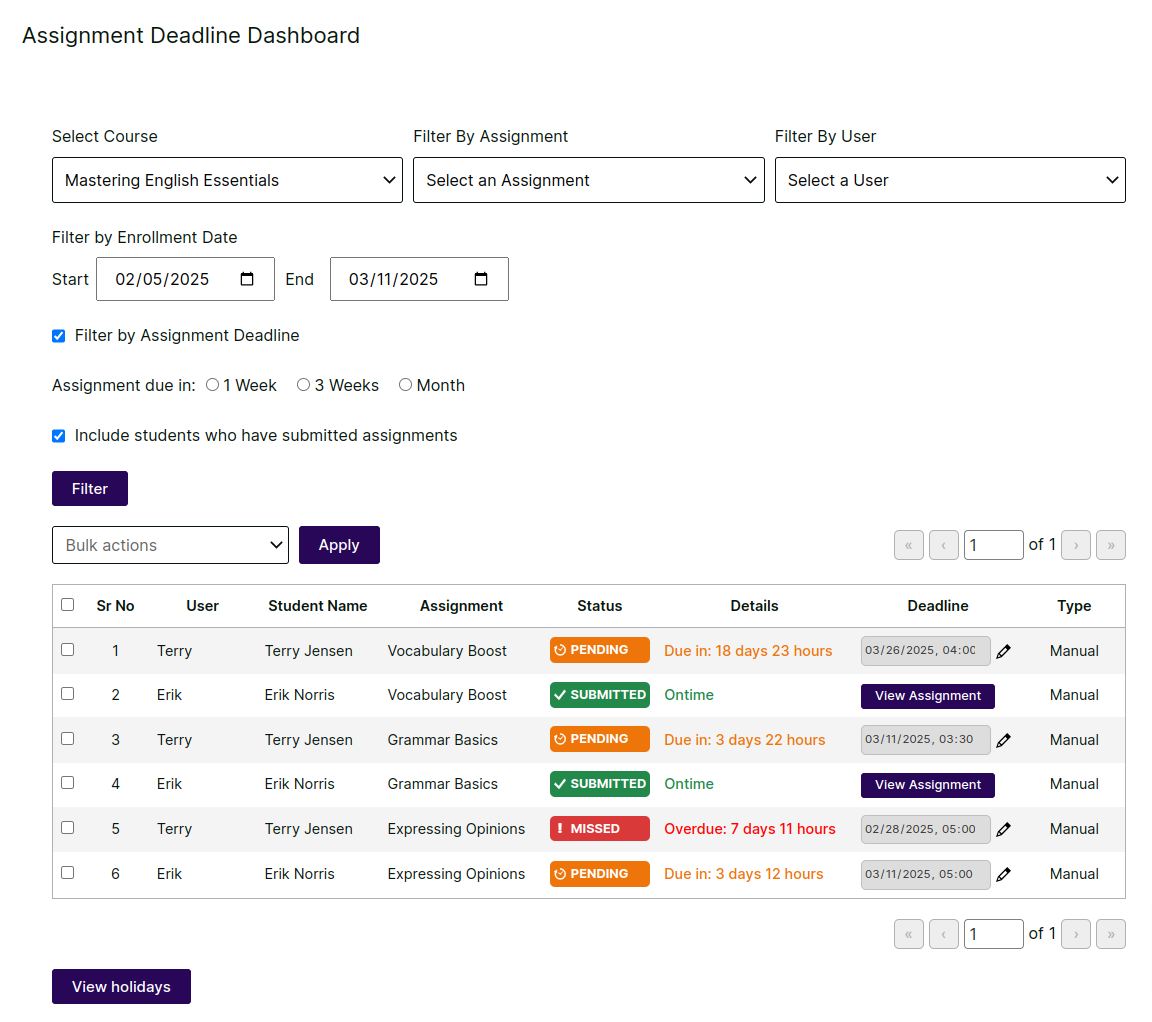
For instructors managing multiple courses at once, the plugin’s centralized dashboard lets you update deadlines for all LearnDash assignments in one place. Instead of going into each course individually, instructors can easily modify deadlines across various courses.
If a student needs extra time due to special circumstances, you can quickly extend their LearnDash assignments deadline without affecting the rest of the class.
This flexibility allows for individualized extensions without compromising the overall course structure.
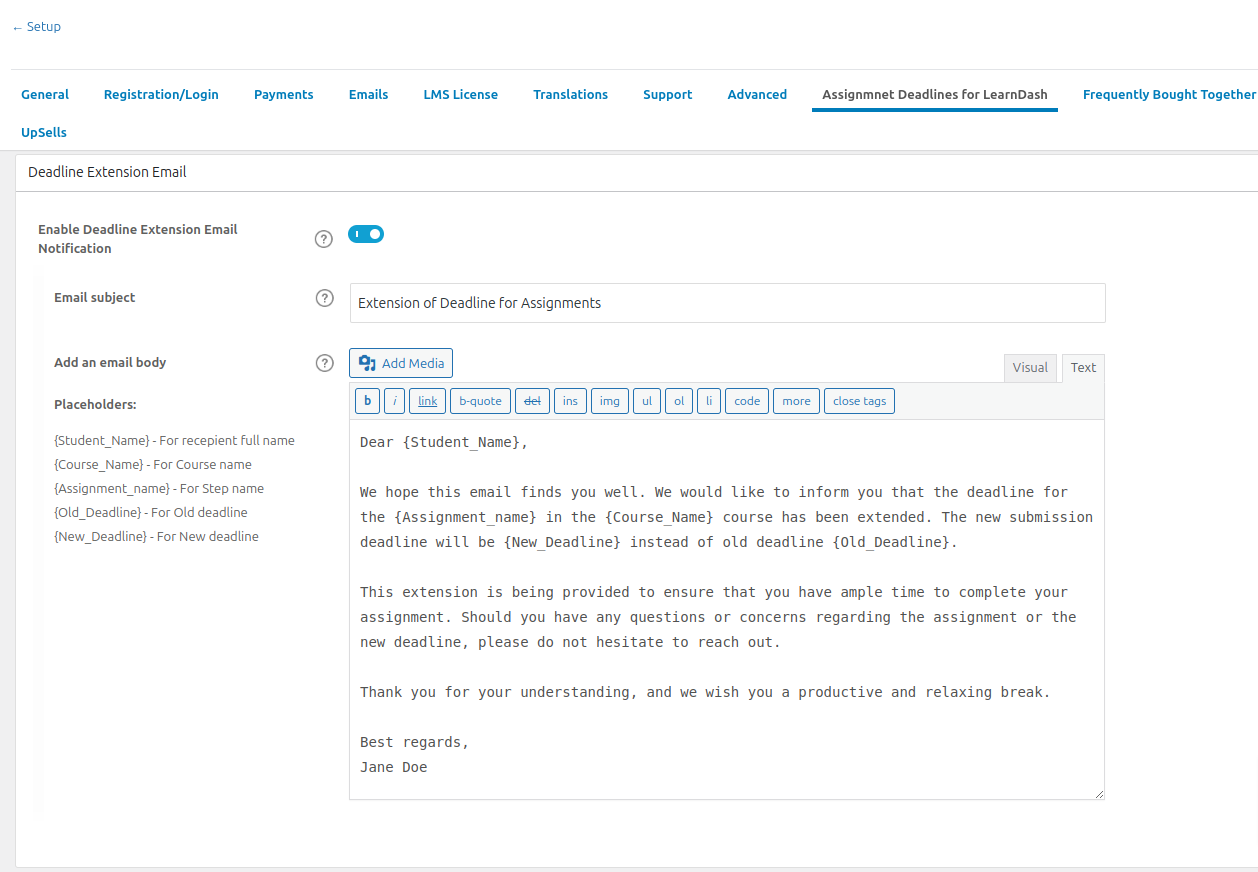
Effortlessly notify students about deadline changes when extending assignment deadlines. With Assignment Deadlines Pro for LearnDash, you can send personalized emails informing learners of their new submission dates.
Whether extending by a few hours or several days, students receive clear communication, eliminating confusion and ensuring they stay on track. Imagine a scenario where a major holiday interrupts your course schedule. Instead of manually contacting each student, you can extend all assignment deadlines by a day or more with a single action.
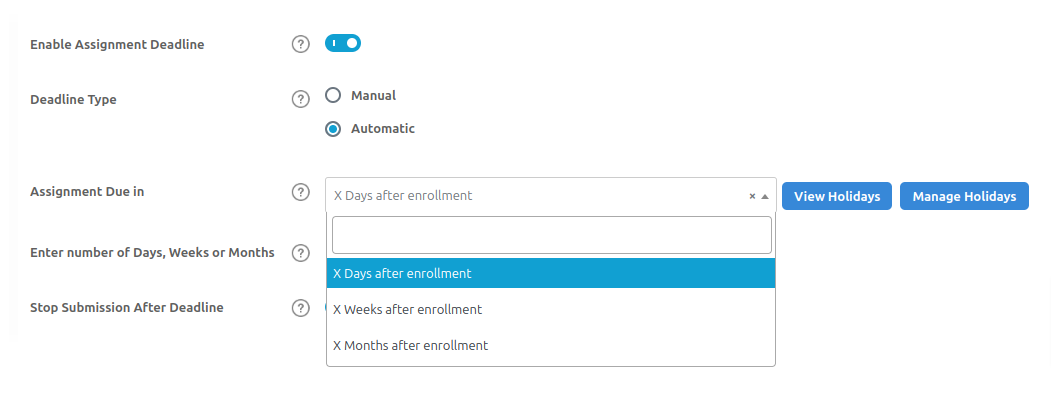
If your LearnDash courses allow rolling enrollments, you can use the plugin’s automatic deadline feature to set LearnDash assignments deadlines based on each student’s enrollment date.
This ensures personalized deadlines for every student, no matter when they join the course.
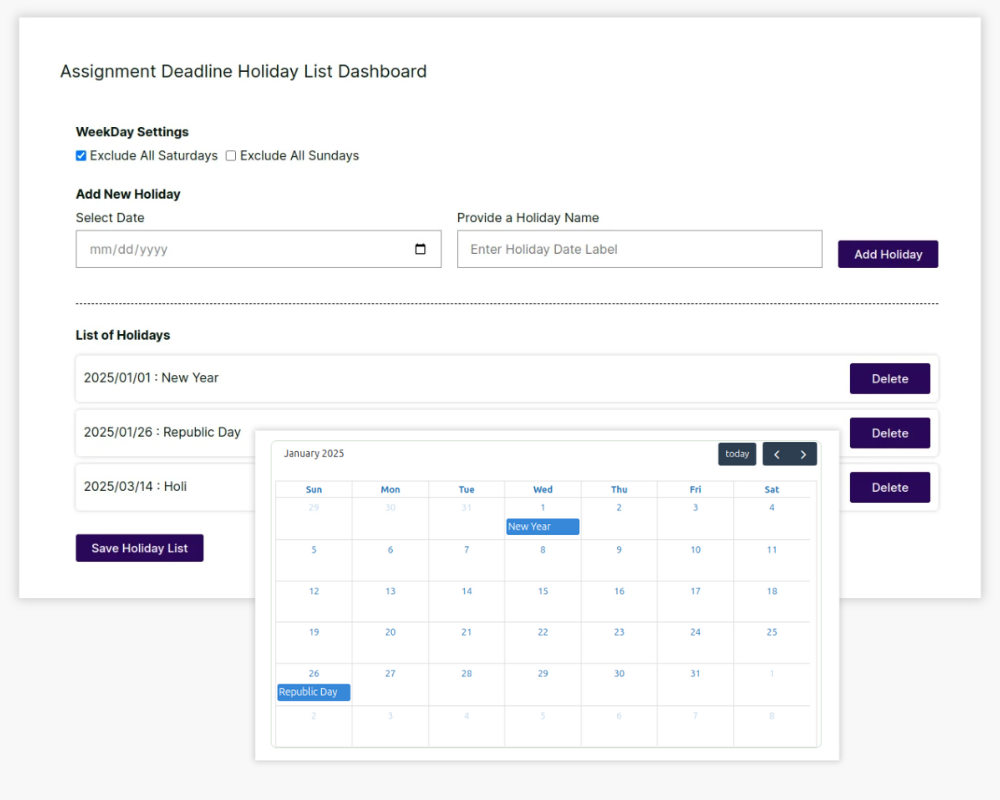
With Assignment Deadlines Pro for LearnDash, you can seamlessly set weekends, public holidays, and summer/winter breaks within assignment schedules.
This ensures that deadlines are automatically adjusted, allowing students to manage their coursework without disruptions during academic breaks.
Key Plugin Features
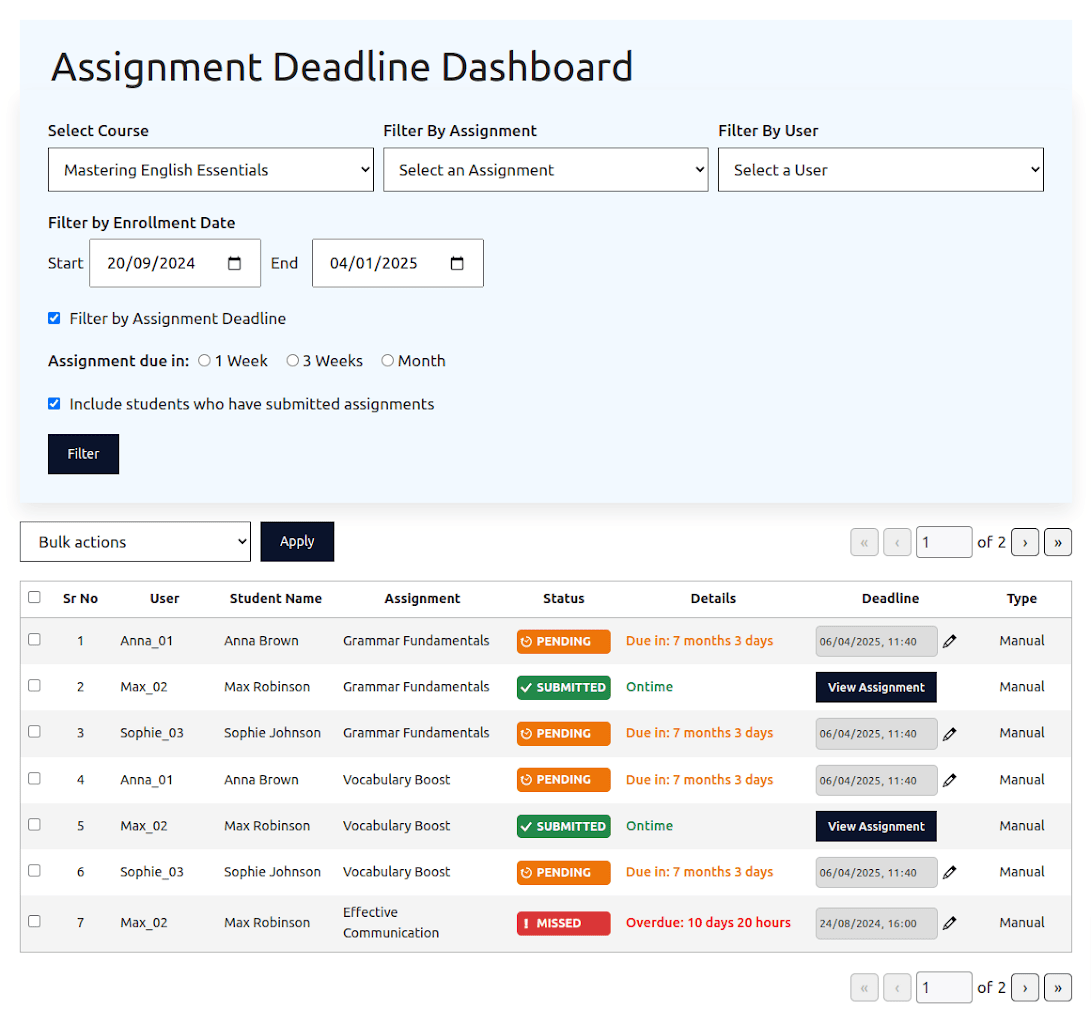
Manage All LearnDash Assignment Deadlines from a Single Dashboard!
Exciting News! Now, you can easily update LearnDash assignment deadlines from a single screen without going to backend for every assignment! Just choose a course and voila you can bulk update assignment deadlines for multiple students in one go!
Plus, when students submit their assignments on time, you can also view them right away on a single click. Simple and saves you time!
NEW
Automatic Assignment Deadlines based on Enrollment Date
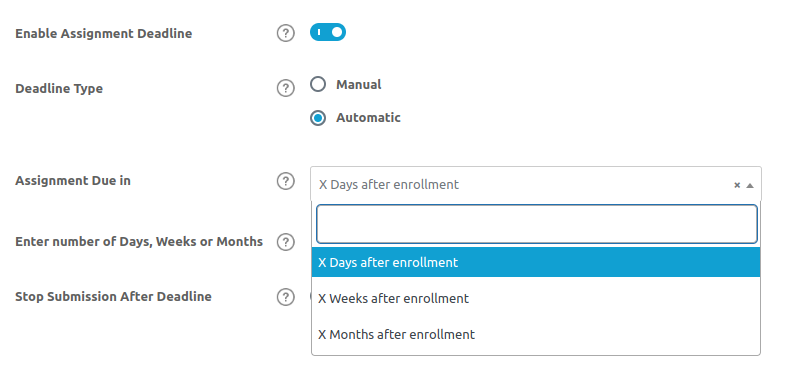
This plugins offers an ‘automatic’ deadline option that allows assigning assignment deadlines to students based on their course enrollment dates to ensure personalized assignment timelines.
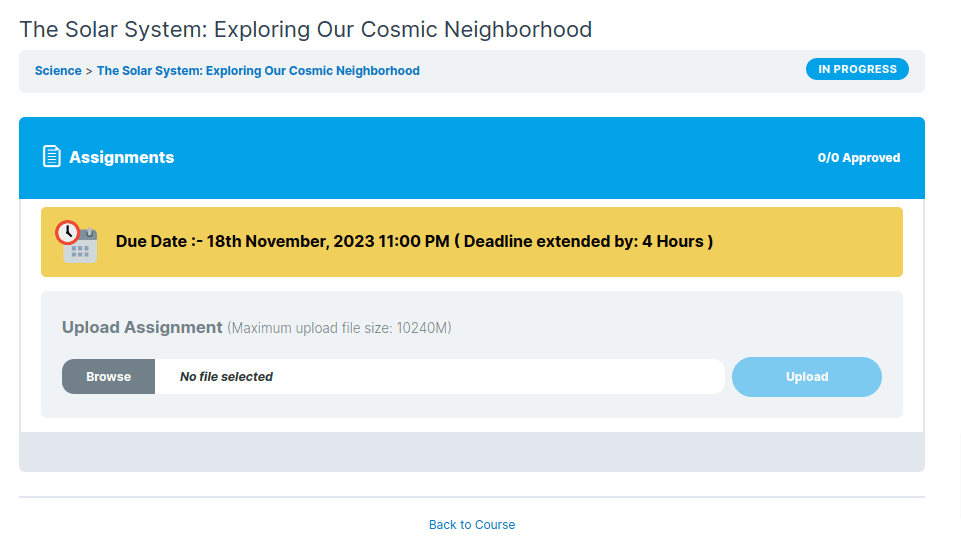
Extension Flexibility
Extend deadlines with the option to add extra hours or days, offering flexibility while maintaining course momentum. Give your learners the breathing room they need with this flexible feature. It’s the perfect balance—flexibility for them, while you keep the course momentum alive and thriving.
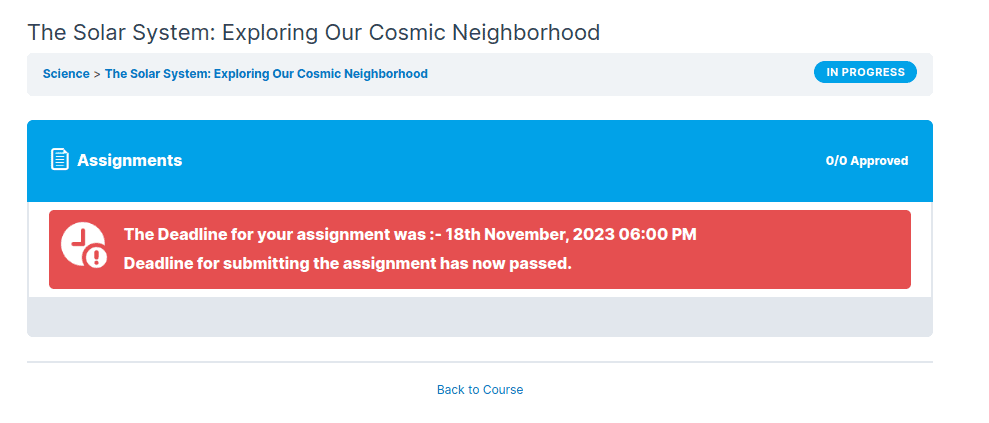
Submission Restrictions
Enforce submission rules post-deadline to ensure discipline. By creating structure and accountability, you’re building a learning environment where every learner is on track and success becomes second nature.
NEW
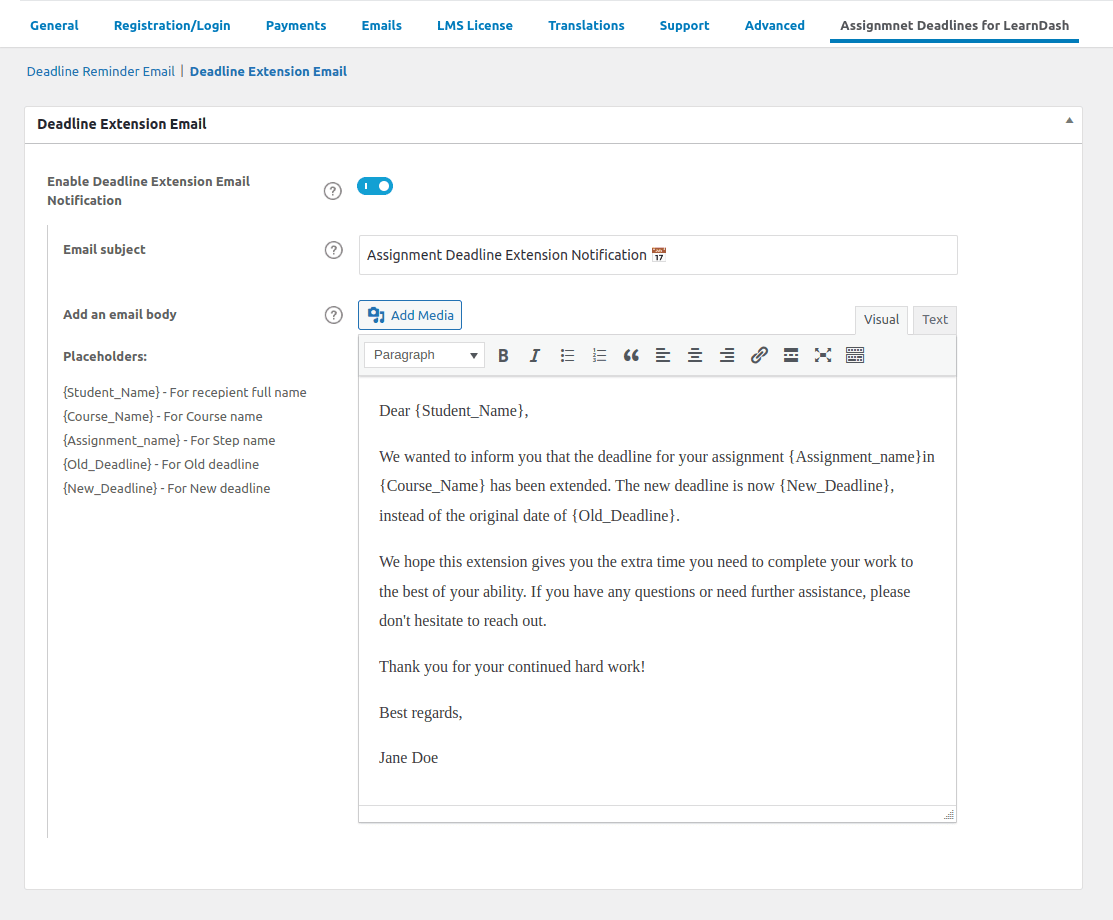
Automated Email Notifications for Deadline Extensions On LearnDash Assignments
You can seamlessly extend deadlines and be assured that your students receive assignment deadline notification emails. This way, everyone knows that deadlines have been extended/changed. You can notify your students individually or in bulk, ensuring everyone stays informed.

NEW
Customizable Email Notifications for Assignment Deadlines
Set personalized reminders using placeholders and hit your students’ inboxes at just the right time to keep everyone on track! With our customizable reminder email notification feature, tailor your emails to your specific needs!
COMING SOON !
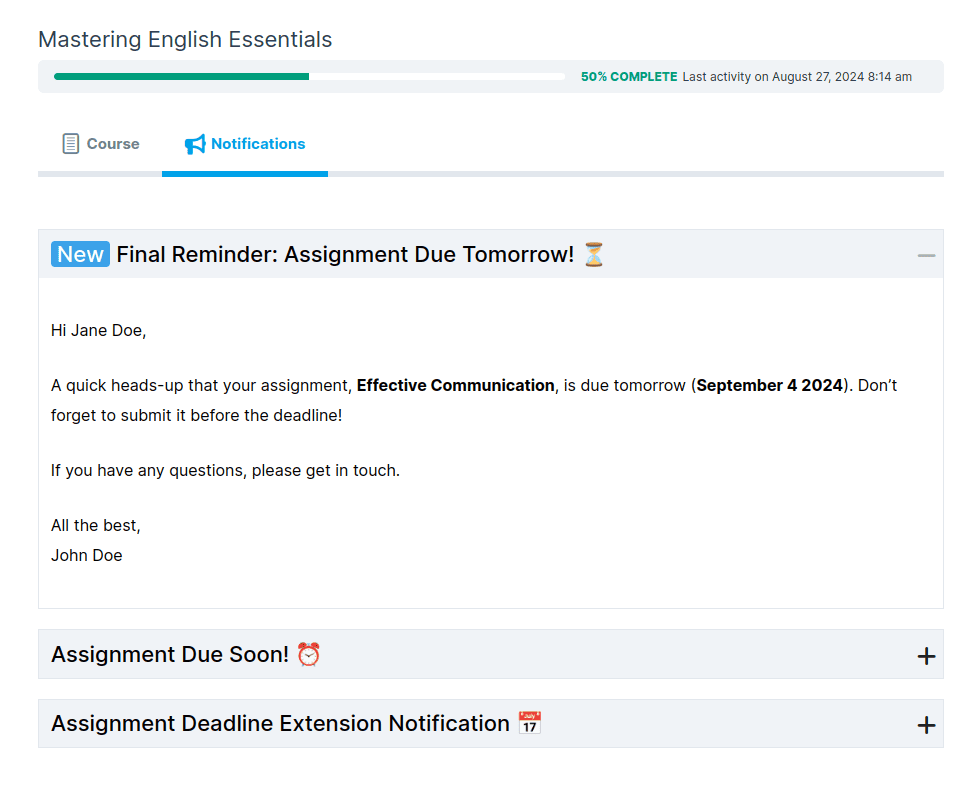
Integration with Student Email Notifications for LearnDash!
Great news! Our new integration with Student Email Notifications for LearnDash will offer a more comprehensive solution that will allow students to view all assignment deadlines notifications right from the Notifications tab located on the course page itself!
“Assignments Deadline for LearnDash” is not just a plugin; it’s an essential tool for enhancing your LearnDash experience, ensuring that your courses run smoothly and efficiently, with a perfect blend of structure and flexibility. Try it now and take your course management to the next level!
How You Can Benefit from Assignment Deadlines Pro for LearnDash
1 Structured Learning with Assignment Deadline Controls
Create a more organized and structured learning environment by setting specific deadlines for all LearnDash assignments.
This encourages students to manage their time better and follow a clear path throughout the course, promoting better assignment management.
2 Centralized Deadline Management for Greater Efficiency
Effortlessly manage all LearnDash assignments and deadlines from a single dashboard, eliminating the need to navigate through each assignment’s backend.
This streamlined LearnDash assignment management saves valuable time, allowing you to quickly update deadlines for multiple students at once, boosting productivity.
3 Automatic Deadlines Based on Enrollment Date
Take advantage of our plugin’s automatic deadline feature, which sets deadlines based on individual course enrollment dates.
This feature ensures that every LearnDash assignment aligns with personalized student timelines, making LearnDash assignment management easier, especially for rolling course enrollments and self-paced learning.
4 Extend Deadlines Easily Without Disrupting Workflow
Give students extra time on their LearnDash assignments when needed, without manual hassle. With just a few clicks, you can extend deadlines by hours or days, maintaining course flow while offering flexibility to students who require it.
5 Enforce Post-Deadline Submission Rules for Fairness
Ensure fairness by enforcing post-deadline submission rules across all LearnDash assignments.
This feature helps maintain course integrity by restricting late submissions, encouraging students to submit on time, and promoting a disciplined learning environment.
6 Seamless Deadline Extension Notifications
When assignment deadlines are extended, students automatically receive email notifications, keeping them updated in real-time.
This feature ensures that all students stay informed about their LearnDash assignments, minimizing confusion and promoting timely submissions.
7 Customizable Email Notifications to Keep Students on Track
Keep students engaged with personalized email reminders for upcoming LearnDash assignment deadlines or extensions.
Use placeholders to craft tailored messages, ensuring active participation and timely submissions as part of effective assignment management.
8 Bulk Email Notifications for Deadline Changes
Efficiently notify groups of students about any changes or extensions to LearnDash assignments with bulk email notifications.
Whether you’re addressing the entire class or select students, you can ensure they stay informed and on track.
9 Improved Course Management for Instructors
By simplifying deadline updates and email communications for LearnDash assignments, instructors can focus more on course content and student engagement rather than administrative tasks.
This enhances the overall efficiency of course management, improving both instructor and student experiences.
10 Integration with LearnDash’s Student Notifications
Through integration with the Student Email Notifications feature, students can easily access all LearnDash assignments deadlines, and updates right from the course page.
This seamless integration ensures students are always aware of important dates and any changes.
Click for a Live Demo of 'Assignment Deadlines Pro for LearnDash'
View DemoPricing Plans

$
$
$
$
$
$
$
$
$
$
$
$

100% Risk-Free Money Back Guarantee!
We guarantee you a complete refund for new purchases or renewals if a request is made within 15 Days of purchase
Frequently Asked Questions
How do I set a deadline for an assignment using the plugin?
Setting up deadlines is simple with the Assignments Deadline feature in the LearnDash plugin. After installing and activating the plugin, navigate to the ‘Assignment Settings’ under ‘Assignment Uploads’ in your LearnDash course. Here, you can enable the assignment deadline feature. You have two options: select ‘Manual’ to set a uniform deadline for all students, or choose ‘Automatic’ to adjust deadlines dynamically based on each student’s enrollment date.
How does the Automatic Deadline Setup work?
By enabling an automatic deadline the assignment deadline will automatically be adjusted according to the enrollment date of the student into the course. For eg if the deadline is set for 5 days after enrollment date the assignment will due exactly after 5 days of the student enrollment into the course.
Is it possible to extend a Manually added deadline once it's set?
Absolutely! This plugin offers the flexibility to extend Manually added deadlines as needed. If you need to give your students extra time, you can easily adjust the deadline by adding more hours or days. This extension can be done directly from the assignment settings, ensuring that any changes are quick and hassle-free.
Can students submit assignments after the deadline has passed?
The plugin allows you to enforce submission restrictions post-deadline. This means you can choose whether or not to accept assignments after the deadline. If you enable this restriction, submissions will not be accepted past the deadline, helping you maintain discipline and order in your course schedule.
How are students notified of an extension of a manually added assignment deadline?
The Assignments Deadline for LearnDash plugin includes a feature to automatically notify students via email about any deadline extensions. These notifications are customizable, allowing you to add your own message or details. This ensures that all students are kept up-to-date with the latest information regarding their assignments.
Is it possible to customize the extended deadline notification emails?
Yes, you have full control over the content of the extended deadline notification emails, ensuring they align with your communication style.
Is there a demo available to test the plugin before purchase?
Yes we offer a demo of the plugin to help you evaluate its features and see if it meets your needs. click here to see the demo.
I am not able to find the solution I’m looking for. Can you develop it for me?
Yes, we offer LearnDash Customization services for specific requirements.
Screenshots
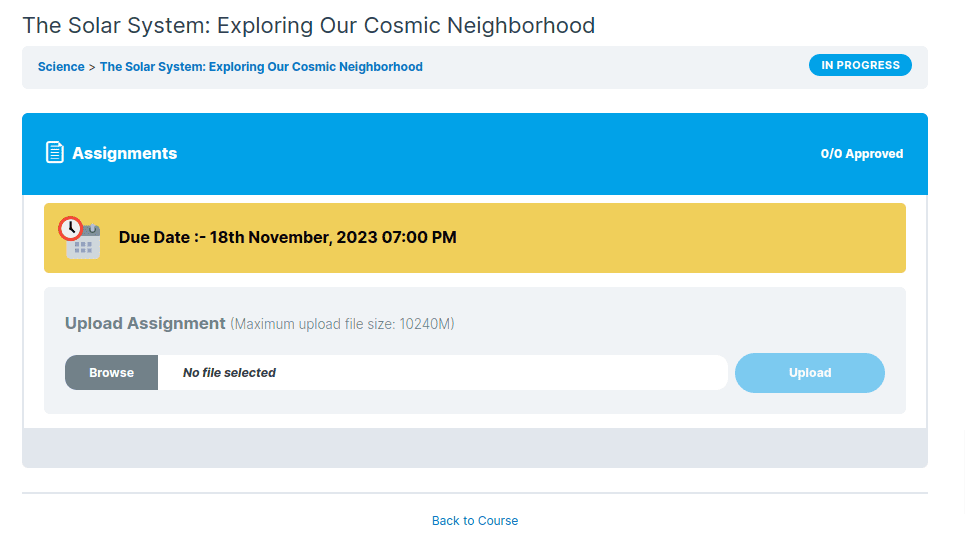
Assignment deadline notice
Extended assignment deadline notice
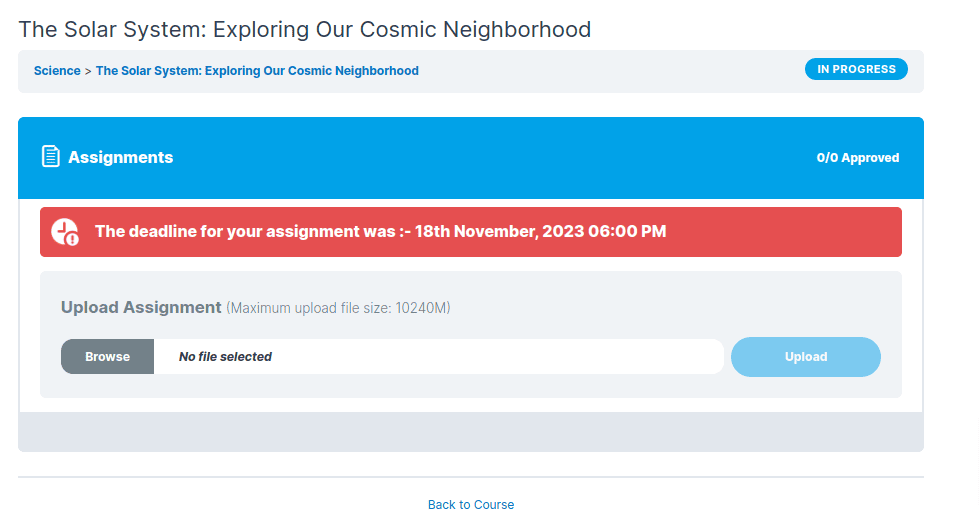
Deadline past notice
Deadline past notice with stop submission
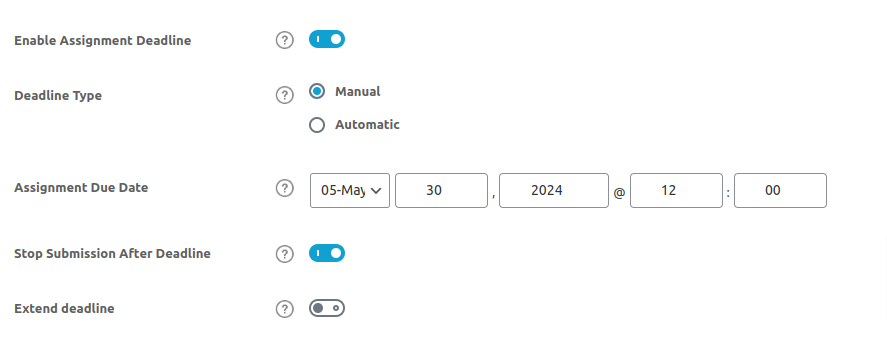
Manual Assignment deadline setup
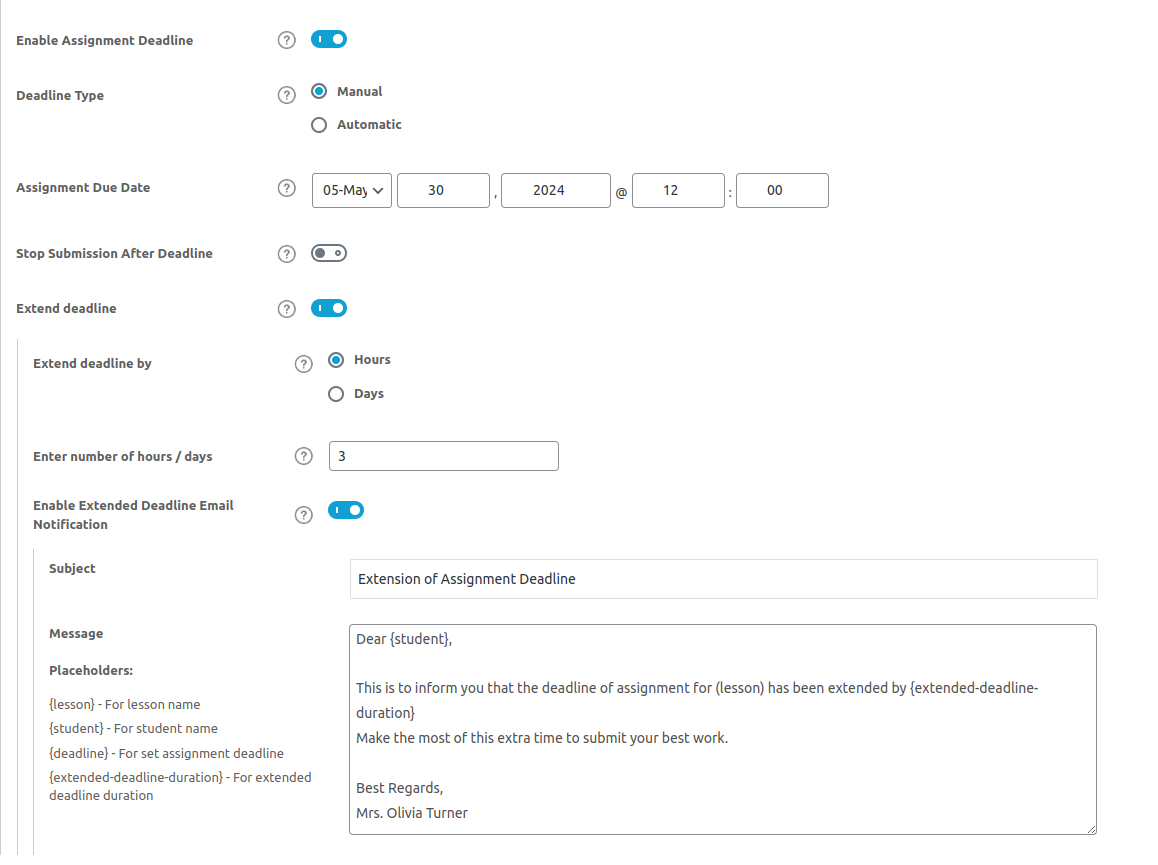
Deadline Extension with Customize Email notification
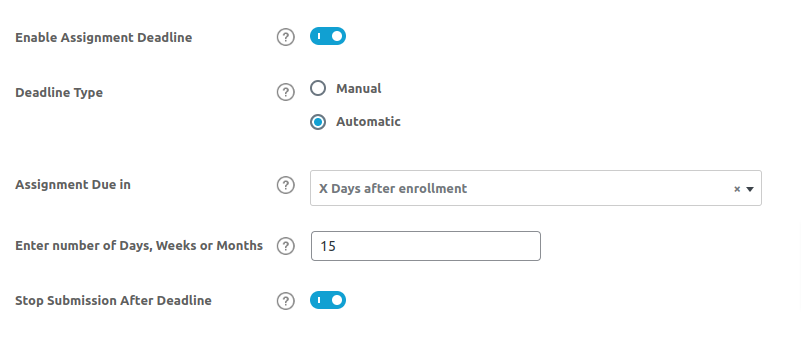
Automatic Assignment Deadline setup
Documentation & Support
Installation Guide
Checkout our guides and instructions to setup Assignment Deadlines Pro for LearnDash for a quick and hasslefree experience.
Changelog
Know about recent updates to get a better idea about recent changes in the plugin.
Reviews
 Essential for Managing Deadlines
This plugin has been crucial for managing assignments in my online courses. Setting up deadlines is incredibly straightforward, and I love the flexibility to extend deadlines when necessary. It keeps both students and instructors aligned.
Thank you for your feedback.
41 of 87 people found this review helpful.
 Streamlined Assignment Management
We've implemented the Assignment Deadlines Pro plugin across several departments, and it's significantly streamlined our operations. The ability to enforce deadlines and restrict late submissions has made our courses much more efficient.
48 of 96 people found this review helpful.
Help other customers find the most helpful reviews
Did you find this review helpful?
 Improves Course Discipline
The automated email notifications feature is a standout. It keeps students informed of any changes in their deadlines, which in turn, has improved punctuality in submissions. It’s an indispensable tool for any e-learning platform.
41 of 85 people found this review helpful.
Help other customers find the most helpful reviews
Did you find this review helpful?
 A Game Changer for Online Education
Adopting this plugin has transformed how we manage assignments. Its user-friendly interface allows for easy setting and extending of deadlines, while the customization options for notifications mean we can maintain our unique voice in communications. Highly recommended for educational institutions adapting to more digital coursework.
41 of 80 people found this review helpful.
Help other customers find the most helpful reviews
Did you find this review helpful?
 Reliable and User-Oriented
The Assignment Deadlines Pro plugin is incredibly reliable. Setting deadlines, extending them, and customizing email notifications are all done effortlessly. It integrates well with our existing systems, making it an essential part of our e-learning toolkit.
43 of 81 people found this review helpful.
Help other customers find the most helpful reviews
Did you find this review helpful?