Dynamic Cart Messages Pro for WooCommerce
Cart Power Play: Boost Sales with Dynamic Messages!
Unlock the potential of your WooCommerce site with our revolutionary plugin. Tailor your customers’ shopping experience by displaying personalized messages on the cart page, encouraging them to add more products and increase their cart value for preferred items or categories.
Current Version
1.2.0
WordPress
6.3.1 or Higher
WooCommerce
8.0.3 or Higher
PHP
8.1 or Higher
Last Update
04 Sep 2024
Plugin Overview & Features
Elevate your WooCommerce sales strategy with Dynamic Cart Messages Pro for WooCommerce, a game-changer for online businesses. This powerful plugin enables you to strategically craft personalized WooCommerce cart messages on the WooCommerce cart page, compelling customers to enhance their cart value for preferred products or categories.
Streamline your WooCommerce cart messages with the new Import & Export feature, allowing you to easily back up or transfer dynamic cart messages. By exporting all your WooCommerce cart notices into a CSV file, you can migrate to a new store or restore messages effortlessly. Simply upload the file to instantly apply all settings, eliminating the need for manual data entry and ensuring uninterrupted cart messaging.
Visualize attracting customers to their cart just a bit more to unlock exclusive discounts tailored to their preferences. With the Bulk Selection feature, you can apply the same WooCommerce cart messages to multiple products, regardless of their category, all in just a few clicks. This makes it easier than ever to maintain consistent WooCommerce cart notices across your store, helping you boost sales with unified promotions.
Need to launch new promotions fast? The Duplicate/Clone feature lets you quickly copy an existing WooCommerce cart message and tweak it for fresh campaigns. Perfect for seasonal sales or repeat offers, this feature saves time by allowing you to replicate successful cart messages without starting from scratch.
Whether it’s showcasing limited-time promotions, enticing you to explore related products, or setting specific thresholds for exclusive discounts, this plugin turns your WooCommerce cart page into a dynamic sales driver. Picture this: a persuasive message encouraging customers to “Add one more item for a 10% discount on your preferred category.” Set specific price or quantity thresholds to trigger messages, guiding customers toward a more rewarding shopping experience.
With the flexibility to display messages on the Cart, Checkout, and Product pages, you can strategically influence purchasing decisions at every step. And by setting countdowns, you create a sense of urgency, prompting swift purchasing decisions.
Dynamic Cart Messages Pro for WooCommerce isn’t just a plugin; it’s your secret weapon to captivate customers, increase average cart values, and drive impactful sales. Plus, with WooCommerce cart reports, you can track the performance of your messages, helping you make data-driven decisions to further optimize conversions. Revolutionize your WooCommerce store today and watch as tailored messages transform casual browsers into delighted, high-value customers.
Real-Time Insights for Smarter Shopping
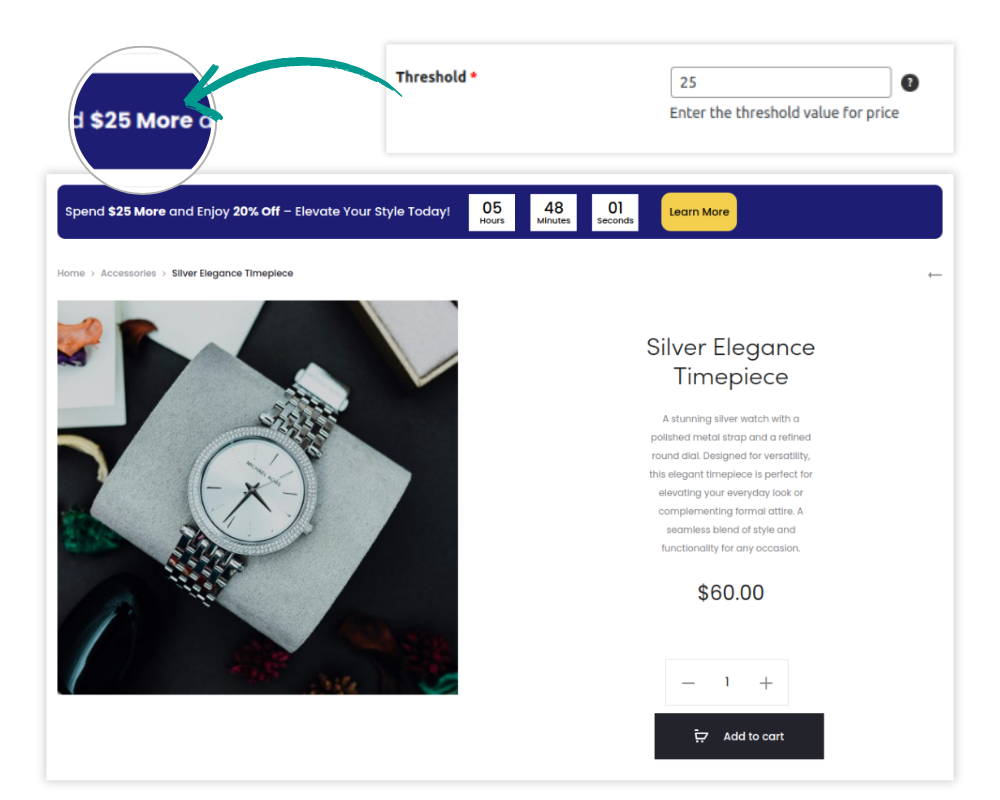
Provide instant feedback as customers shop, displaying dynamic messages that inform them of the additional amount or items needed to unlock special offers. This real-time guidance enhances the shopping experience and incentive structure.
NEW
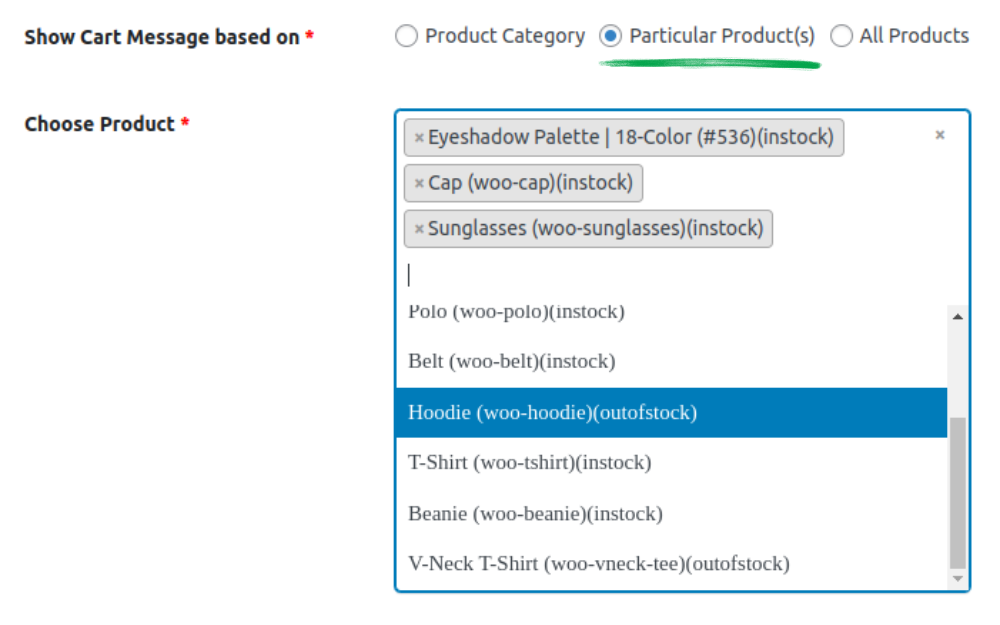
Apply Dynamic Cart Messages to Multiple Products in Just a Few Clicks!
Tired of setting cart messages one product at a time? With our bulk selection feature, you can apply the same WooCommerce cart messages to multiple products—no matter their category—all at once! This makes it easier than ever to create consistent WooCommerce cart notices across your store, ensuring a unified shopping experience and promoting your deals with ease.
Versatile Messaging Rules that Converts to Sales
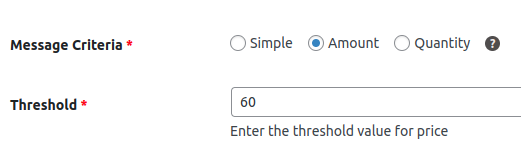
Customize your approach with three distinct rule types—Simple, Price-based, or Quantity-based. Design messages that resonate deeply, encouraging more significant sales by targeting customer preferences and behaviors.
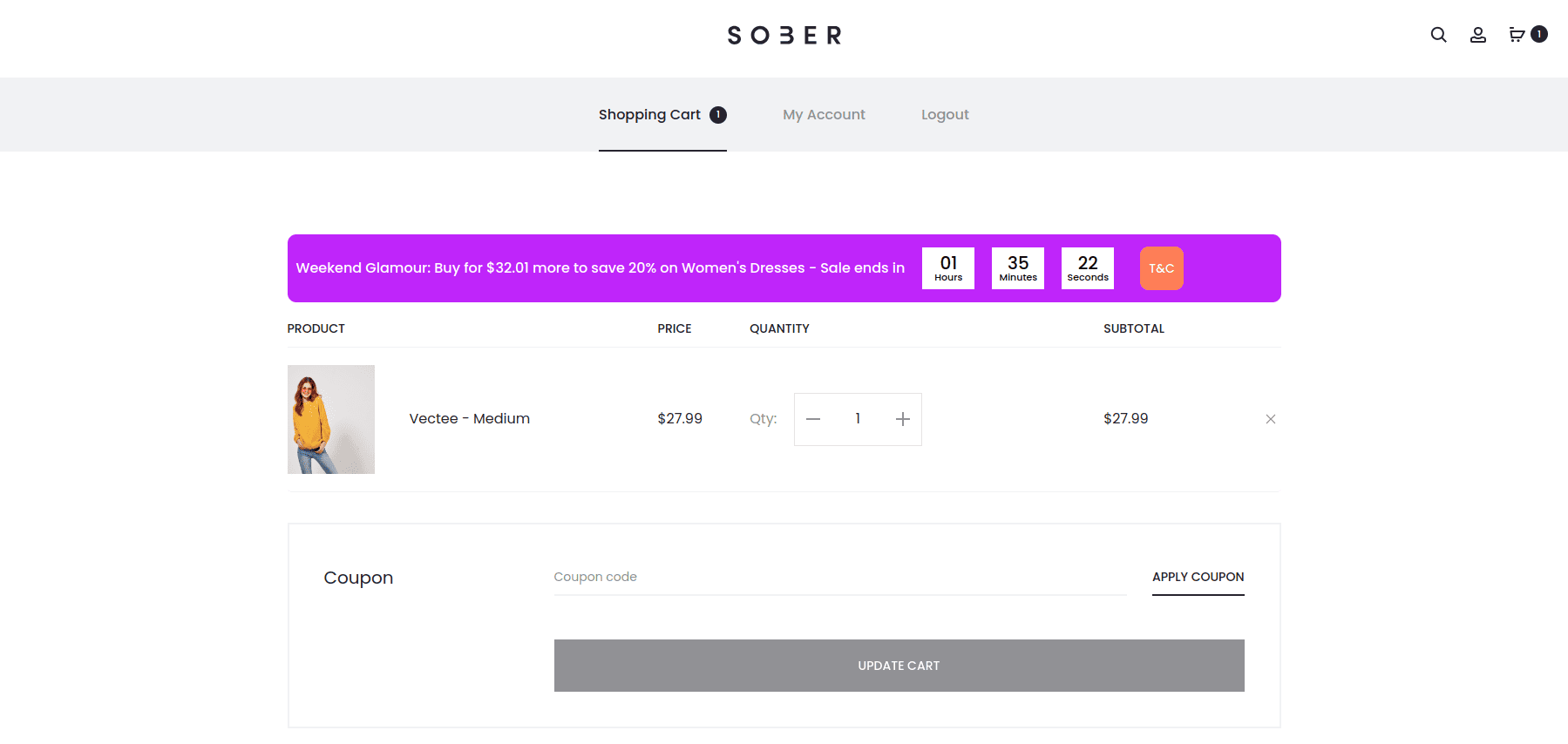
Drive Action with Urgency-Driven Countdowns
Create a sense of urgency that motivates immediate action. With customizable Countdown Timers, you can set up both Scheduled and Evergreen countdowns. These timers work seamlessly alongside Cart Messages, nudging customers towards making swift decisions during their buying journey.
Enhance Decision Making with Strategic Placement
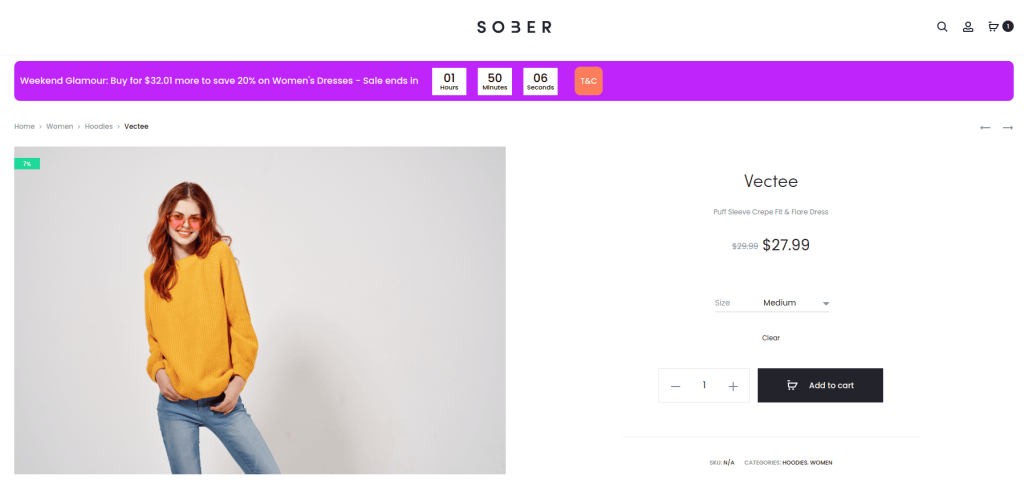
Position your Cart Messages where they matter most. With options to display messages on the Cart Page, Checkout Page, and Product Page, you’re in full control of influencing purchasing decisions at key stages. This strategic placement ensures your messages are seen and acted upon, optimizing conversion opportunities.
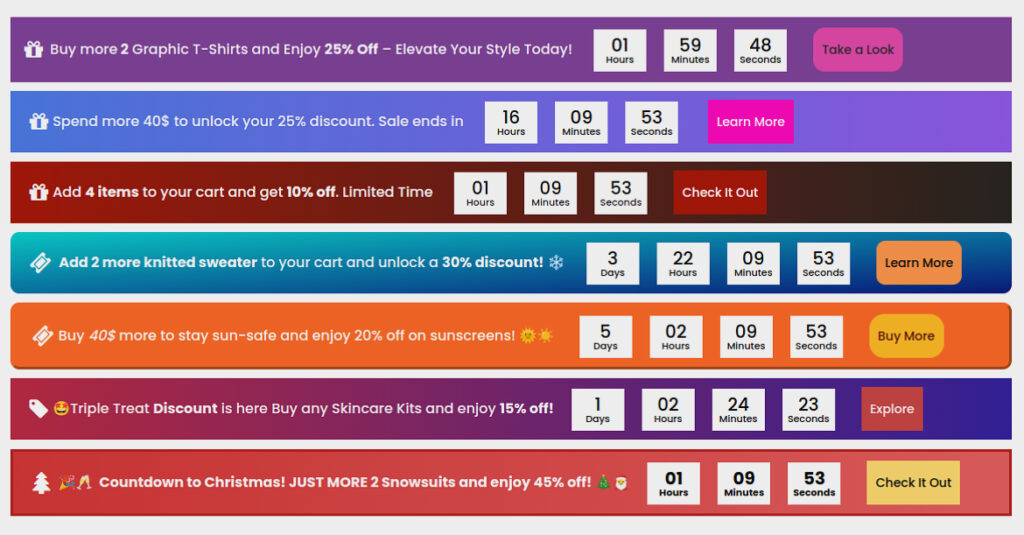
Predefined Cart Message Templates with Vibrant Styles
Transform your cart messages with the all-new Color Scheme Control! Choose from 10 predefined styles or tweak them to perfection. Feeling creative? Build your own color scheme from scratch and ensure every cart message matches your store’s aesthetic seamlessly.
Boost Engagement with Prioritized Messaging
Maximize the impact of your promotions with the “Prioritize Cart Messages” feature. This innovative tool empowers you to order cart messages by priority, ensuring customers see the most relevant offers first. Say goodbye to cluttered messaging and hello to a streamlined, strategic approach that not only simplifies the shopping experience but also encourages larger purchases.

Fully Customizable Cart Message with Color Control
Dictate the visual theme of your cart messages and icons with customizable color schemes. Set the tone of your store’s messaging to match your brand’s aesthetic, creating a cohesive and engaging shopping experience.
Fully Customizable Cart Message with Color Control
Dictate the visual theme of your cart messages and icons with customizable color schemes. Set the tone of your store’s messaging to match your brand’s aesthetic, creating a cohesive and engaging shopping experience.
Enhanced Preview for Precision
Say goodbye to guesswork! With the new Enhanced Preview feature, admins can now preview all three cart messages in dedicated tabs. Seamlessly switch between previews to fine-tune your messaging strategy and ensure each message is perfectly tailored to captivate your customers.
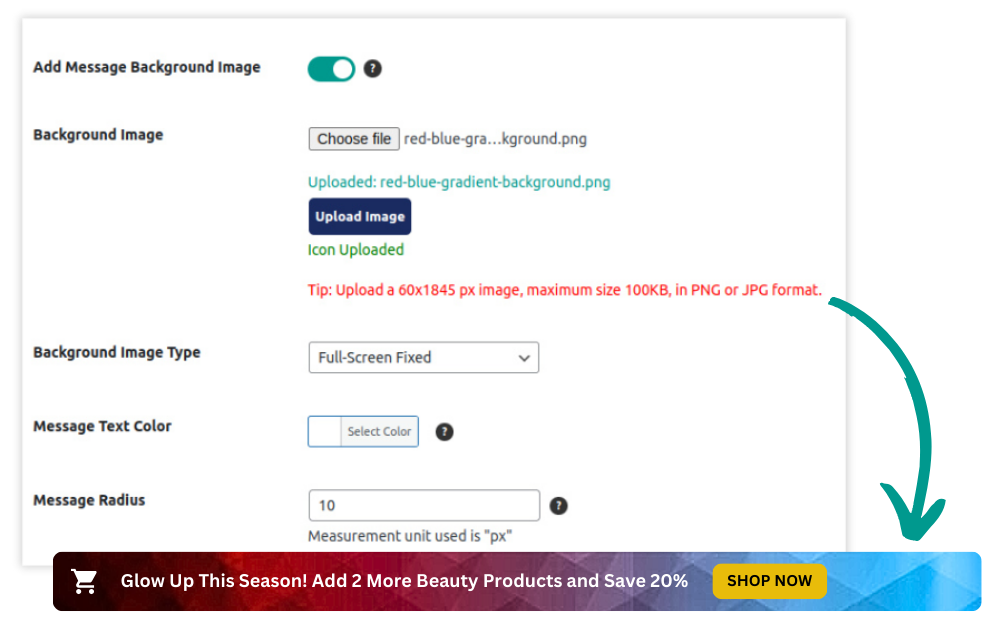
NEW
Eye-Catching Image Backgrounds
Elevate your cart messages with Image Backgrounds! Admins can now replace solid colors with custom images as backgrounds for cart messages, adding a unique and visually appealing touch that enhances the overall shopping experience and makes your offers stand out even more.
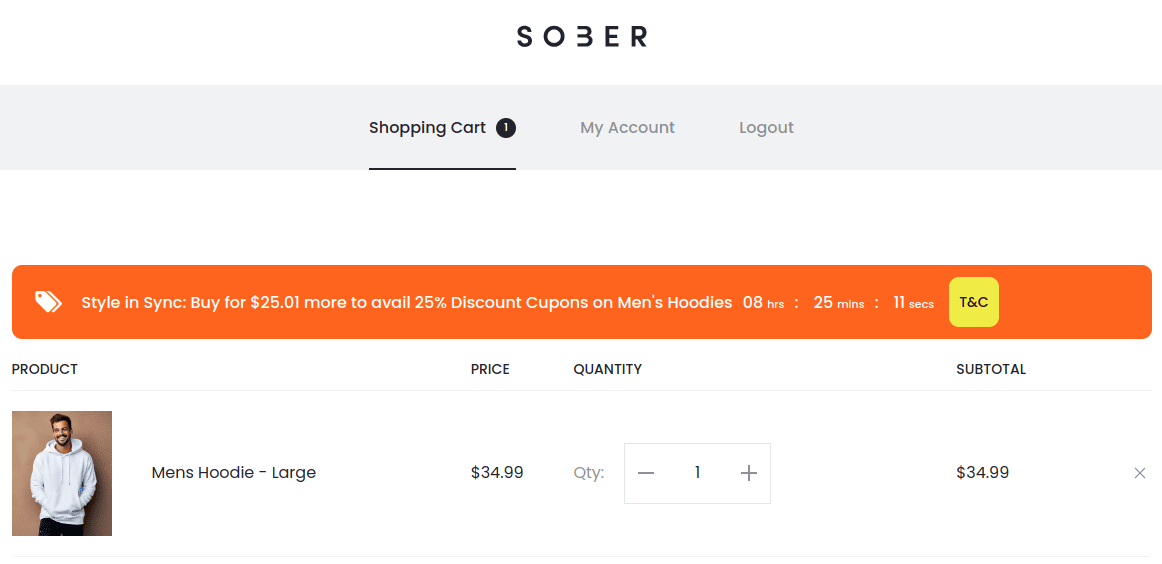
Turn Interest into Sales with Clear Call to Actions!
Clarify the path to purchase with actionable prompts next to offers. Direct access to terms and conditions next to enticing deals builds customer trust and promotes a transparent shopping environment.
NEW
Attention-Grabbing Button Animations
Boost engagement with Button Animations! Now, you can add eye-catching animations to your call-to-action buttons. Choose from 10 ready-made animations to make your buttons stand out and capture your customers’ attention, driving more conversions and enhancing the shopping experience.
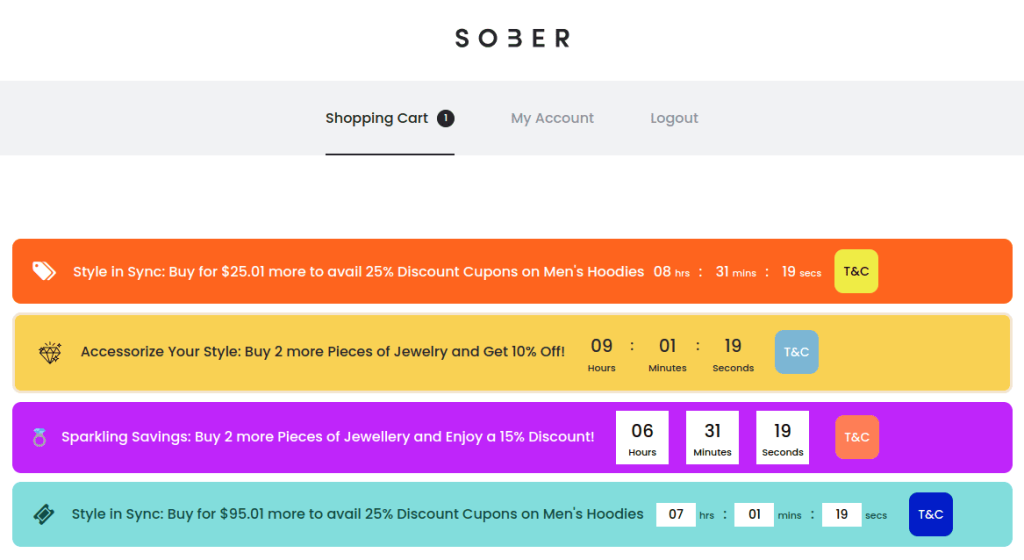
Countdown Designs that Spark Urgency
Select from four stunning countdown designs to create urgency that’s not only effective but also aesthetically pleasing, ensuring your messages capture attention and drive action.

NEW
Effortless Import & Export for Seamless Cart Message Management
You can now easily back up or transfer dynamic cart messages by exporting all your WooCommerce cart notices into a CSV file. Whether you’re migrating to a new store or need to restore cart messages, the import functionality lets you upload that file and apply all the settings instantly.
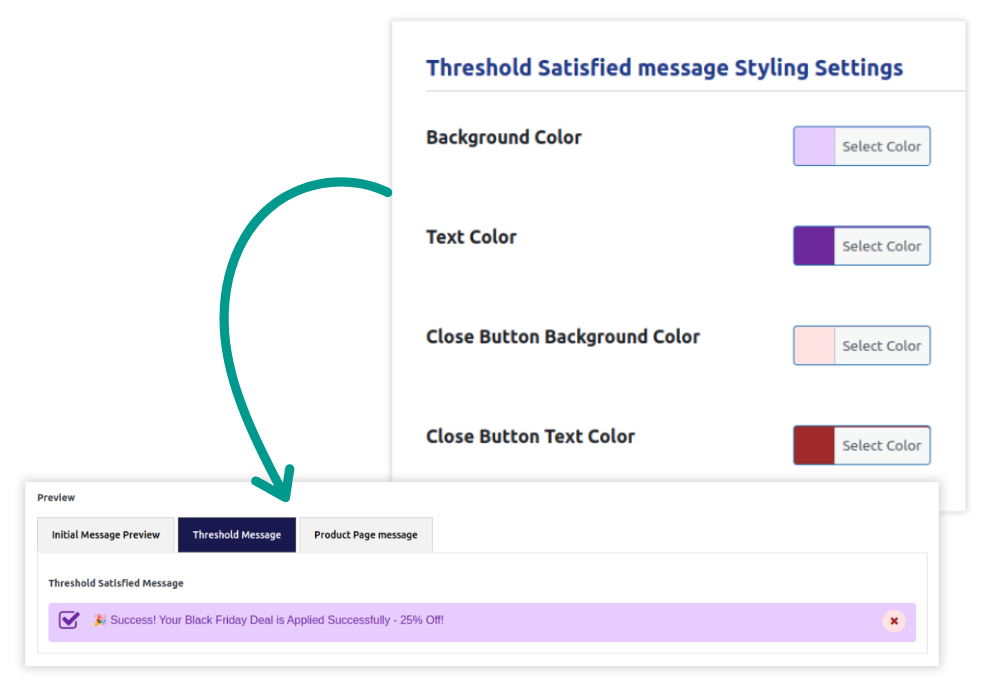
Customizable Threshold Satisfied Message
Take control of your messaging with the new Customizable Threshold Satisfied Message! Previously, admins couldn’t adjust the style of this message, but now with the global setting, you can easily customize its color scheme to match your store’s look and feel, enhancing the shopping experience.
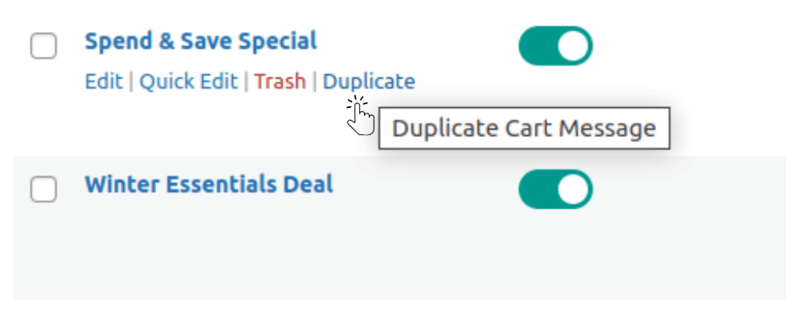
Clone Cart Messages for Rapid Rollouts of New Promotions
Streamline your promotions with the Duplicate/Clone feature. Quickly copy and edit WooCommerce cart messages for new campaigns, perfect for seasonal sales or repeated offers.
Revolutionize your sales journey, boost customer engagement, and witness a substantial increase in your WooCommerce store’s success with “Dynamic Cart Messages Pro for WooCommerce.” Tailor your approach, create urgency, and elevate the shopping experience for your customers, all with a single dynamic plugin.
Dynamic Cart Message Pro is Compatible with Popular Add-ons





Click for a Live Demo of 'Dynamic Cart Messages Pro for WooCommerce'
View DemoPricing Plans
$
$
$
$
$
$
$
$
$
$
$
$

100% Risk-Free Money Back Guarantee!
We guarantee you a complete refund for new purchases or renewals if a request is made within 15 Days of purchase
How Can This Plugin Be Used
Encouraging Seasonal Product Purchases
Use WooCommerce cart messages to promote seasonal or holiday products. For example, during the holiday season, you can display a message like, “Add one more holiday-themed item to your cart and receive a free gift!” This use of WooCommerce cart notices inspires customers to increase their order value and engage with timely offers directly on the WooCommerce cart page.
Promoting New Arrivals
Highlight newly launched products by displaying WooCommerce cart messages that promote exploration of your latest collections. For instance, when a customer adds an item to their cart, you could show a message like, “Check out our new arrivals and get 5% off when you add one to your cart!” This strategy enhances WooCommerce add to cart interactions, encouraging customers to discover new items and boost their overall order value.
Discount Qualification Reminders
If your store offers discounts based on cart total, use WooCommerce cart notices to remind customers when they’re close to qualifying. For example, “Spend just $20 more to qualify for a 10% discount on your order” can pop up on the WooCommerce cart page, ensuring customers know how close they are to earning extra savings. This encourages them to add more items to their cart, driving higher sales.
Exclusive Member-Only Offers
Display targeted WooCommerce cart messages for loyalty program members, creating a personalized shopping experience. For example, if a customer is logged in as a member, show a message like, “As a loyalty member, add one more item and get an additional 15% off.” These WooCommerce cart notices ensure members feel valued and incentivized to add more to their cart, boosting sales on the WooCommerce cart page.
Free Gift with Purchase
Encourage customers to hit certain thresholds by offering a free gift, using WooCommerce add to cart incentives. For example, “Add $25 more to your cart and receive a free gift!” This message appears directly on the WooCommerce cart page, motivating customers to increase their order size and giving them an extra reason to finalize their purchase.
Promote Clearance or End-of-Season Sales
During sales events like clearance or end-of-season sales, the Dynamic Cart Messages Pro for WooCommerce plugin can be extremely useful for promoting limited-time offers. A message like, “Add one more clearance item to your cart and enjoy an extra 10% off!” displayed on the WooCommerce cart page helps drive customers to purchase more sale items and clear out inventory. The strategic use of WooCommerce cart messages increases engagement with discounted products.
Loyalty Points Reminders
Maximize your store’s loyalty program by displaying WooCommerce cart notices that remind customers how close they are to earning rewards. For example, “Add $30 more to earn 100 loyalty points!” can appear during the WooCommerce add to cart process, encouraging customers to spend more to achieve their points goal. This tactic fosters customer retention while boosting cart values.
Cart Recovery Tactics for Incomplete Purchases
For customers returning to incomplete purchases, WooCommerce cart messages can offer incentives to complete their orders. Display a message like, “Complete your purchase now and get 15% off!” on the WooCommerce cart page to recover abandoned carts. These timely, personalized reminders encourage hesitant shoppers to take action, reducing cart abandonment rates.
Promoting Subscription Services
Use Dynamic WooCommerce cart messages to promote subscription products directly in the cart. When a customer adds a product, show a message like, “Subscribe now and save 10% on every order!” These WooCommerce cart messages turn one-time buyers into repeat subscribers, increasing long-term sales and customer loyalty.
Encouraging Bulk Purchases
The Dynamic Cart Messages Pro for WooCommerce plugin can also remind customers of bulk purchase discounts. For instance, display a message like, “Buy 3 or more and save an additional 15%” when the customer adds multiple items to their cart. This can be shown on the WooCommerce cart page to motivate customers to purchase in larger quantities, maximizing each transaction and making the most of WooCommerce add to cart incentives.
Screenshots
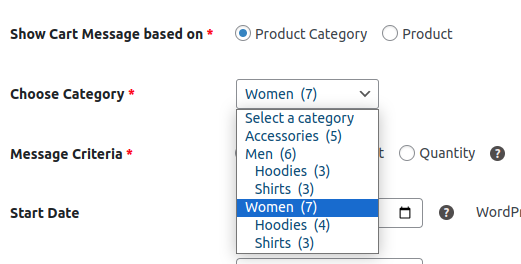
Setting Cart Message for a Category Product
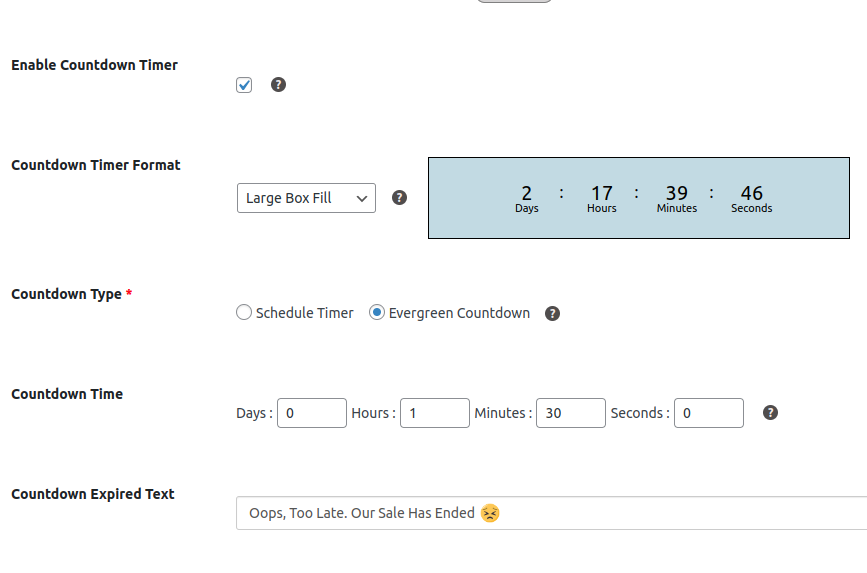
Setting Countdown Timer and its Design
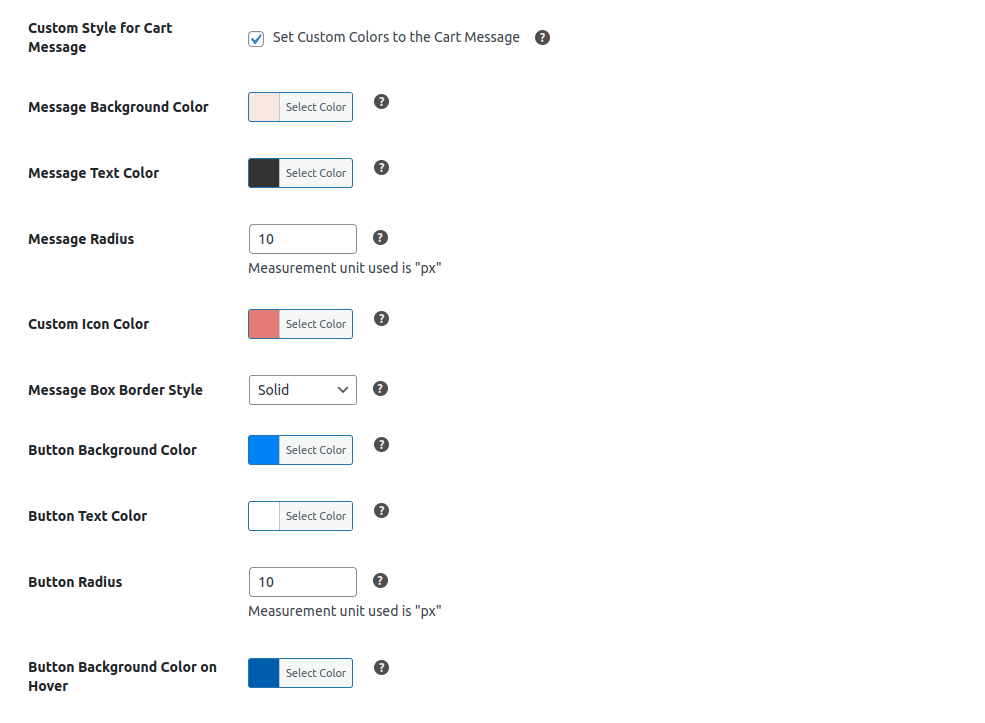
Setting Cart Message Style
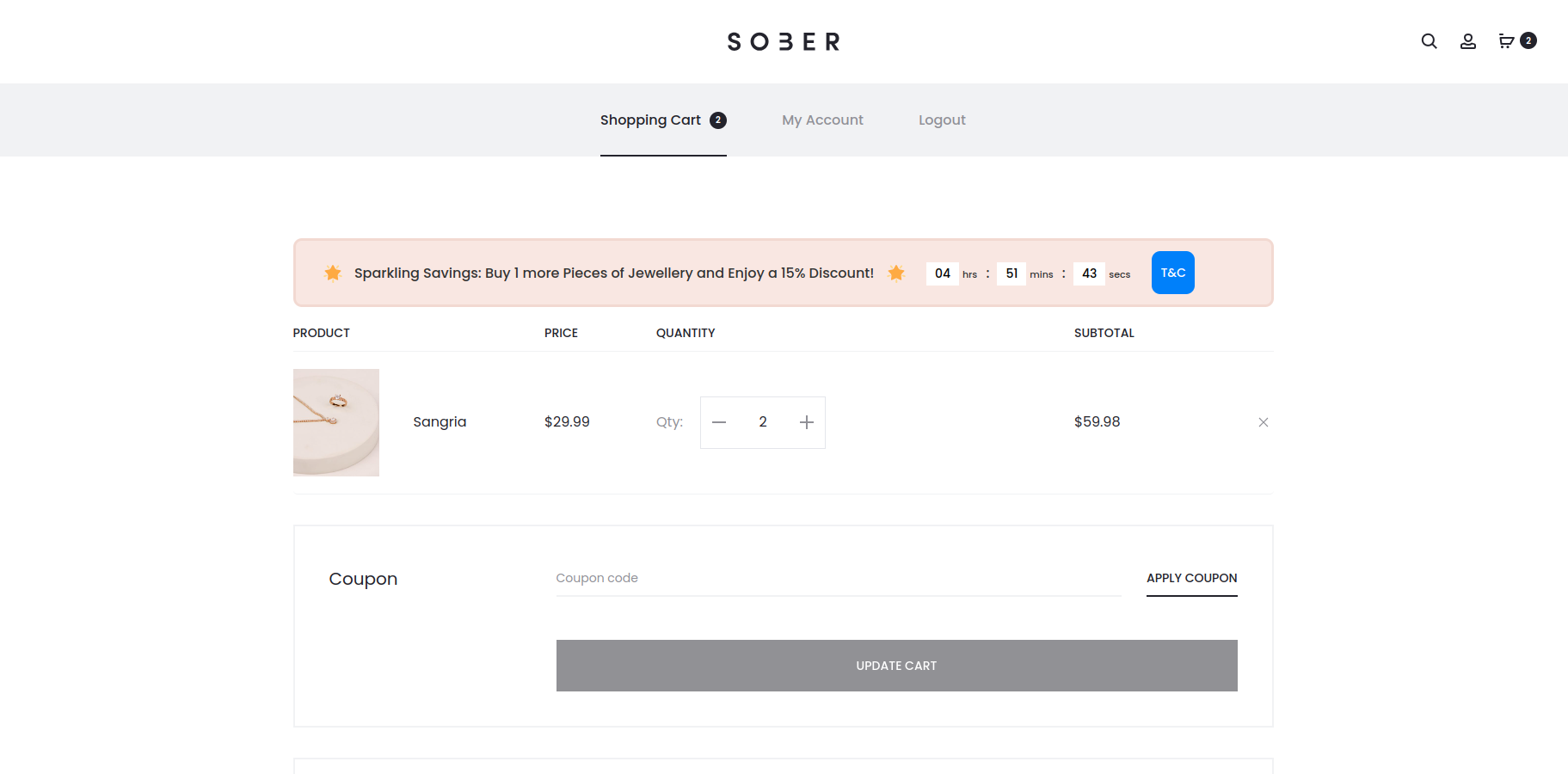
Cart Message on Cart Page
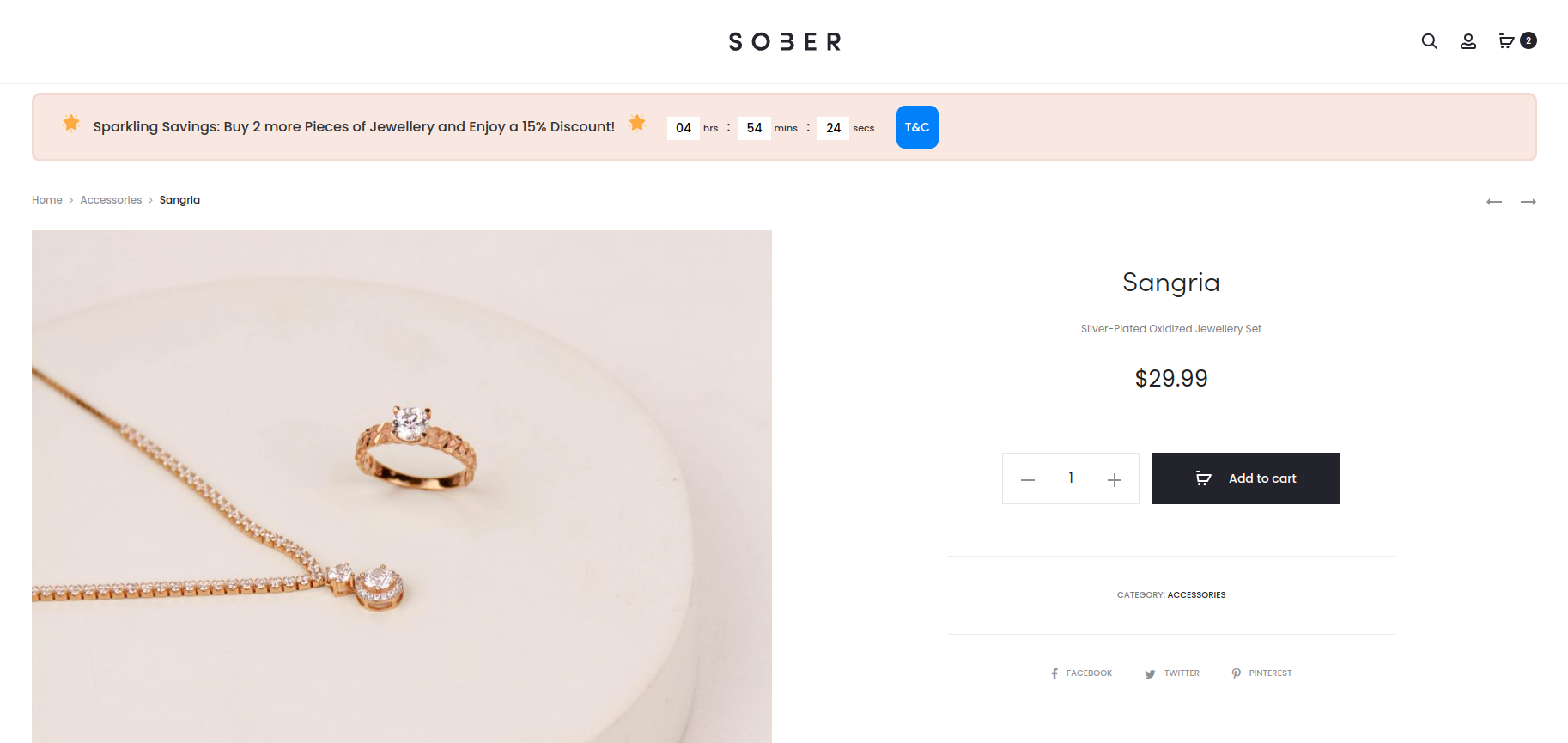
Cart Message on Product Page
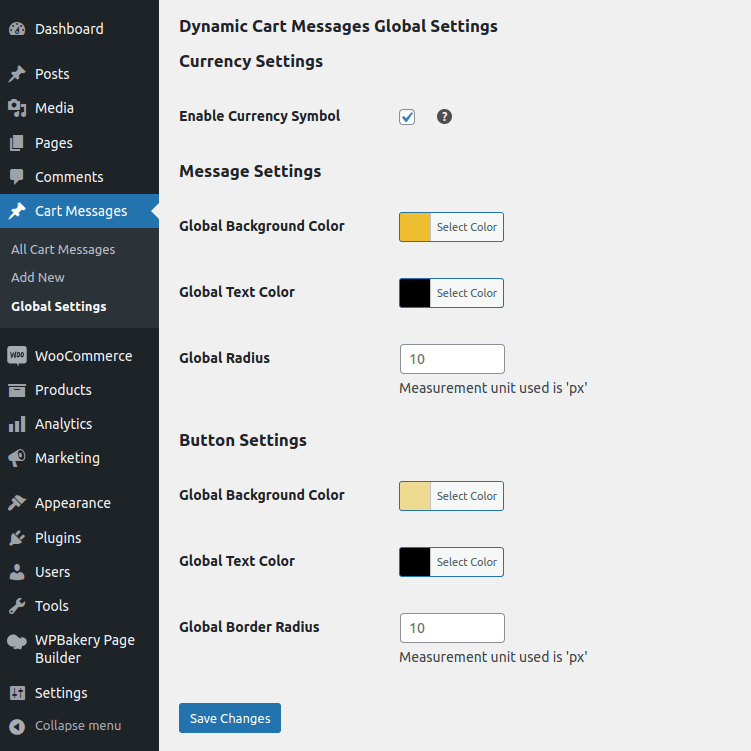
Global Settings
Frequently Asked Questions
How does this plugin help boost sales on my WooCommerce site?
The plugin enables you to display tailored messages on the cart page, incentivizing customers to add more quantity or value to their carts. This strategic approach increases the average cart value, ultimately boosting sales.
Can I customize where these messages are displayed?
Yes, you have full control. Messages can be shown on the Cart Page, Checkout Page, and Product Page, allowing you to strategically influence customer behavior at crucial touchpoints.
What types of rules can I set for these messages?
You can set rules based on three types: Simple, Price-based, or Quantity-based. This flexibility enables you to tailor your approach to boost sales effectively.
Can I target specific products or categories with these messages?
Absolutely. You can direct messages to a particular product, product category, or apply them globally to cater to your sales strategy.
How does the countdown timer create urgency?
The countdown timer prompts customers to make swift purchases by showing them how much time is left to avail special offers. You can choose between Scheduled Countdown for precise sale periods and Evergreen Countdown for continuous urgency.
Can I schedule when these messages should be displayed?
Yes, you have full control over when messages should appear. Set Start and End Dates with exact times to align with your marketing schedule or timed sales campaigns.
Can I preview how the messages will look before going live?
Certainly. The plugin provides a preview functionality, allowing you to see how your cart messages will appear with all chosen options, such as colors, icons, and countdowns.
Not ready for the Pro version yet?
No problem! You can download the free version of the plugin from here. Here’s the difference between the free and pro version of the plugin. Also you can view a demo of pro version here.
I am not able to find the solution I’m looking for. Can you develop it for me?
Yes, we offer Custom WooCommerce Development services for specific requirements.
Want to Try out the Dynamic Cart Message Free Plugin?
Download from WordPressDocumentation & Support
Installation Guide
Explore our guided documentation for a quick and hassle-free experience
Changelog
Know about recent updates to get a better idea about recent changes in the plugin.
Reviews
 Highly Effective for Stock Clearance
We use this plugin to highlight limited-time offers and clearance items. The customizable messages help us move inventory quickly and keep customers engaged with fresh deals. A must-have for any WooCommerce store!
Thank you for your feedback.
12 of 23 people found this review helpful.
 Enhanced Customer Experience
I was looking for ways to increase my average order value in my store. I checked a few blogs and came across this plugin. Initially, I thought it just showed a static cart notice. But, I realized quickly that it does much more than what I thought initially. It allows you to set cart messages based on quantity and price. So, I use it to incentivise customers to add more products to the cart and also allows to personalize those messages. Such personalized cart messages make my customers feel valued, leading to higher conversion rates and increased average order value.
11 of 23 people found this review helpful.
Help other customers find the most helpful reviews
Did you find this review helpful?